Dynamics GP – Cannot insert the value NULL into column ‘ORTRXAMT’

When enquiring on a debtor account using the “Receivables Transaction Enquiry” window I was prompted with the error below:

Cannot insert the value NULL into column ‘ORTRXAMT’

When I clicked OK I received the following error message:

The stored procedure rmTransactionInquiry returned the following results: DBMS: 515, Microsoft Dynamics GP: 0

After clicking OK no transactions are displayed in the enquiry window? Hoping this was a one off I checked another debtor and received the exact same error?

After pondering for a while, I realized the clue was in the first error message. The column “ORTRXAMT” is mentioned in the error and I know this client doesn’t use multi-currency management. Therefore I assume at some point they have managed to toggle the currency view to “Originating”.

I therefore clicked “View > Currency” to see which currency display option was selected but the option is greyed out:

View > Currency

At this point I tried various key combinations while holding down CTRL and found CRL+U toggles back to the functional currency display and the transactions appeared!

For those interested CTRL+O toggles back to Originating currency and CTRL+R toggles to the Reporting currency.

Thanks for reading

Warehouse Shipment – The record you tried to open is not available. The page will close or show the next record

While testing the process of creating warehouse shipments I stumbled across an interesting issue. After creating the warehouse shipment from the sales order, I was presented with the message below:

1 Warehouse Shipment Header has been created

Success! I’ve created the warehouse shipment. I clicked OK but was then presented with the message below:

The record that you tried to open is not available. The page will close or show the next record

Hmmm. Something isn’t right. I’ve created warehouse shipments before following the same steps and never had that message. To ensure the shipment had created correctly I clicked Navigate > Whse. Shipment Lines and was presented with the shipment lines as per below. Everything must be fine after all.

Whse. Shipment Lines

I made a note of the warehouse shipment number and hopped over to the Warehouse Shipments page to continue my task however SH000010 wasn’t listed.

Warehouse Shipments

I checked for filters and it was at this point the penny dropped. When I setup my user I didn’t add myself as a “Warehouse Employee” for all locations.

Therefore, to fix the issue I went to the “Warehouse Employees” page and added myself as a user of this location:
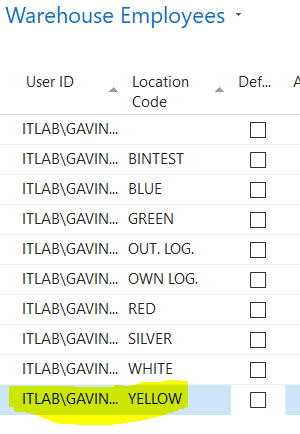
Warehouse Employees

Once I had done this I could see the warehouse shipment. This also explains the strange “The record you tried to open is not available. The page will close of show the next record” message when creating the warehouse shipment.

Thanks for reading