Dynamics GP – All rows mysteriously deleted from SOP Distribution Work\History (SOP10102)

This week I dealt with a very bizarre issue affecting all Sales Order Processing Transactions that I thought was worth documenting. It started with a simple support request explaining that Sales Order Processing Invoice transactions weren’t posting due to missing distributions. See below

Missing SOP Distributions

When I connected to investigate further I found the Sales Order Processing Distribution Work\History table (SOP10102) was, with the exception of a hand full of rows, completely blank. (and those rows related to the most recently added SOP transactions)

As this table contains the distributions for both Work and History documents all distributions on posted Sales Order Processing transactions had been lost as well.

Before I even considered how this could have happened I set about trying to find out which user could have done this, and when it happened, so I could recover the missing data.

The first clue for when this could have happened lay with the SQL transaction log backups. As this table would have had hundreds of thousands of rows, I suspected this would have generated lots of SQL transaction log, so I checked the size of the transaction log backups and this highlighted a larger than normal LOG backup at midday (I could do this as the SQL database is in FULL recovery model and the client performs hourly transaction log backups)

Large transaction log backup at midday

I now suspected the issue had arose between 11am and midday so I set about querying the contents of this SQL transaction log backup file looking for transactions with deletes on the SOP10102 table using the query below.

(As usual I’m standing on the shoulders of giants for this one by using this excellent blog post by SQL guru Paul Randal as the basis of the query https://www.sqlskills.com/blogs/paul/using-fn_dblog-fn_dump_dblog-and-restoring-with-stopbeforemark-to-an-lsn/. As a side note this website is an awesome SQL resource!)

select	
	[begin time] as BeginTime,
	[End Time] as EndTime,
	SUSER_SNAME ([transaction sid]) as UserID, 
	object_name(object_id) as TableName, *
FROM fn_dump_dblog 
	(NULL, NULL, N'DISK', 1, N'D:\...\backup_2019_10_07_120002_5428125.TRN', 
	 DEFAULT, DEFAULT, DEFAULT, DEFAULT, DEFAULT, DEFAULT, DEFAULT,
	 DEFAULT, DEFAULT, DEFAULT, DEFAULT, DEFAULT, DEFAULT, DEFAULT,
	 DEFAULT, DEFAULT, DEFAULT, DEFAULT, DEFAULT, DEFAULT, DEFAULT,
	 DEFAULT, DEFAULT, DEFAULT, DEFAULT, DEFAULT, DEFAULT, DEFAULT,
	 DEFAULT, DEFAULT, DEFAULT, DEFAULT, DEFAULT, DEFAULT, DEFAULT,
	 DEFAULT, DEFAULT, DEFAULT, DEFAULT, DEFAULT, DEFAULT, DEFAULT,
	 DEFAULT, DEFAULT, DEFAULT, DEFAULT, DEFAULT, DEFAULT, DEFAULT,
	 DEFAULT, DEFAULT, DEFAULT, DEFAULT, DEFAULT, DEFAULT, DEFAULT,
	 DEFAULT, DEFAULT, DEFAULT, DEFAULT, DEFAULT, DEFAULT, DEFAULT) as log1
left join sys.partitions part 
	 on part.partition_id=log1.partitionid
where  
	[transaction id] IN
(select 
	[transaction id]
 FROM fn_dump_dblog 
	(NULL, NULL, N'DISK', 1, N'D:\...\backup_2019_10_07_120002_5428125.TRN',
	DEFAULT, DEFAULT, DEFAULT, DEFAULT, DEFAULT, DEFAULT, DEFAULT,
	DEFAULT, DEFAULT, DEFAULT, DEFAULT, DEFAULT, DEFAULT, DEFAULT,
	DEFAULT, DEFAULT, DEFAULT, DEFAULT, DEFAULT, DEFAULT, DEFAULT,
	DEFAULT, DEFAULT, DEFAULT, DEFAULT, DEFAULT, DEFAULT, DEFAULT,
	DEFAULT, DEFAULT, DEFAULT, DEFAULT, DEFAULT, DEFAULT, DEFAULT,
	DEFAULT, DEFAULT, DEFAULT, DEFAULT, DEFAULT, DEFAULT, DEFAULT,
	DEFAULT, DEFAULT, DEFAULT, DEFAULT, DEFAULT, DEFAULT, DEFAULT,
	DEFAULT, DEFAULT, DEFAULT, DEFAULT, DEFAULT, DEFAULT, DEFAULT,
	DEFAULT, DEFAULT, DEFAULT, DEFAULT, DEFAULT, DEFAULT, DEFAULT) as log1
left join sys.partitions part 
	on part.partition_id=log1.partitionid
where 
	operation = 'LOP_DELETE_ROWS' and 
	object_name(object_id) in ('SOP10102')) 
order by [Transaction ID]

I scanned through the results and found the transaction id below which was logging lots of deletes on the SOP10102 table

Transaction showing deletes on SOP10102

I then took this Transaction ID and ran the following SQL query to get full details on this SQL Transaction

select 
	[begin time] as BeginTime, 
	[End Time] as EndTime,
	SUSER_SNAME ([transaction sid]) as UserID, 
	object_name(object_id) as TableName, *
FROM fn_dump_dblog 
	(NULL, NULL, N'DISK', 1, N'D:\...\backup_2019_10_07_120002_5428125.TRN', 
	 DEFAULT, DEFAULT, DEFAULT, DEFAULT, DEFAULT, DEFAULT, DEFAULT,
	 DEFAULT, DEFAULT, DEFAULT, DEFAULT, DEFAULT, DEFAULT, DEFAULT,
	 DEFAULT, DEFAULT, DEFAULT, DEFAULT, DEFAULT, DEFAULT, DEFAULT,
	 DEFAULT, DEFAULT, DEFAULT, DEFAULT, DEFAULT, DEFAULT, DEFAULT,
	 DEFAULT, DEFAULT, DEFAULT, DEFAULT, DEFAULT, DEFAULT, DEFAULT,
	 DEFAULT, DEFAULT, DEFAULT, DEFAULT, DEFAULT, DEFAULT, DEFAULT,
	 DEFAULT, DEFAULT, DEFAULT, DEFAULT, DEFAULT, DEFAULT, DEFAULT,
	 DEFAULT, DEFAULT, DEFAULT, DEFAULT, DEFAULT, DEFAULT, DEFAULT,
	 DEFAULT, DEFAULT, DEFAULT, DEFAULT, DEFAULT, DEFAULT, DEFAULT) as log1
left join sys.partitions part 
	on part.partition_id=log1.partitionid
where  [transaction id] IN ('0000:088fba17')

This query returned 1,466,128 rows all of which are deletes to SOP10102. (this is more than the number of rows in the table which is likely because of the additional deletes on the SQL non clustered indexes that also need maintaining)

Lots of deletes on SOP10102 table

Following on from this I’m now know the user who has caused the deletes, and the exact time it happened. I also know this SQL Login ID relates to a GP user which means this has to have happened inadvertently while using GP. (you can’t use a Dynamics GP SQL Login to access the data via any tool other than Dynamics GP as the password is encrypted)

I asked the user in question if they noticed anything strange at this time like GP crashing or hanging but unfortunately they don’t recall. Therefore this is still a total mystery I’m afraid.

To recover the data I restored the backup to a new database right up to the point of the data going missing i.e. I restored the FULL SQL backup and all LOG backups with NORECOVERY with the exception of the last LOG backup which I restored as per below

I then copied the data back using the SQL query below

INSERT INTO LIVEDB..SOP10102
(SOPTYPE, SOPNUMBE, SEQNUMBR, DISTTYPE, DistRef,
ACTINDX, DEBITAMT, ORDBTAMT, CRDTAMNT, ORCRDAMT,
CURRNIDX, TRXSORCE, POSTED, Contract_Exchange_Rate)
SELECT
A.SOPTYPE,
A.SOPNUMBE,
A.SEQNUMBR,
A.DISTTYPE,
A.DistRef,
A.ACTINDX,
A.DEBITAMT,
A.ORDBTAMT,
A.CRDTAMNT,
A.ORCRDAMT,
A.CURRNIDX,
A.TRXSORCE,
A.POSTED,
A.Contract_Exchange_Rate
FROM RESTOREDDB..SOP10102 A
LEFT JOIN LIVEDB..SOP10102 b
on a.SOPNUMBE=b.SOPNUMBE and a.SOPTYPE=b.SOPTYPE
WHERE
B.SOPNUMBE IS NULL

After running the INSERT query the client confirmed that all the data had been recovered.

I’d be interested to know if anyone else has seen anything similar in the past. Unfortunately I’ve also seen this happen on the Purchase Order Processing side but it was before my blogging days. I’ve also found this Microsoft blog which documents a similar issue that Microsoft support dealt with https://blogs.msdn.microsoft.com/developingfordynamicsgp/2010/04/08/pop-distributions-randomly-being-deleted/

Although I didn’t get to the bottom of the missing POP data I did have my suspicions however there are no related third parties that could have caused this issue with SOP10102.

Unfortunately I suspect this will also remain an unsolved mystery I just hope it doesn’t happen again.

Thanks for reading!

Thinking of making the move to Business Central? We can help

Dynamics 365 Business Central – Error drilling back to the Purchase Order from a Sales Order drop shipment

I recently ran into an issue drilling back on a Purchase Order from a Sales Order with drop shipment lines. The exact error was “Purchase Order No. must have a value in Sales Line…….It cannot be zero or empty” as shown in the screen shot below:

Purchase Order No. must have a value in Sales Line

On investigation this only affected the lines on the Sales Order that had been shipped and invoiced. If I drilled back on an outstanding line on the Sales Order the Purchase Order is displayed without issue. After troubleshooting this it seems when you receive and invoice the line item on a drop shipment the system removes the link back to the Purchase Order and consequently you receive an error trying to drill down.

I’ve detailed how you can recreate the issue below, with a neat trick that can be used to view the data in the Sales Order tables via your browser.

To recreate the error first add a Sales Order with more than one drop shipment line as per below:

Sales Lines marked as Drop Shipment

Next create the Purchase Order and pull through the Sales Order using the function below

Function to Get Sales Order lines

Finally go back to the Sales Order and ship and invoice the first line

The first line has been shipped and invoiced

Now highlight the first line and try and drill back to the Purchase Order using the option below

On doing this you are prompted with the error

Purchase Order No. must have a value in Sales Line

Using the information detailed in this Microsoft article we can view the actual data even though this is the SaaS version of Business Central and I have no access to a development environment https://docs.microsoft.com/en-us/dynamics365/business-central/dev-itpro/developer/devenv-view-table-data

Therefore following this document I added &table=37 to the end of my URL to view the full contents of the Sales Line table

On viewing the data in the table I can see the Purchase Order Number has been removed from the shipped and invoiced line

Purchase Order No. and Purch Order Line No. removed once shipped and invoiced

This is preventing me from drilling back on the Purchase Order. If you check the Purchase Line table (table 39) you can see the Sales Order number has also been removed, so you wouldn’t be able to drill down on the Sales Order from the Purchase Order either.

I also worked through the issue on my local Dynamics NAV install and observed the same behaviour, therefore I’m sure this is by design, however I’m unsure of the reasons. It seems the link to the Purchase Order is permanently removed once the sales line has been shipped and invoiced.

I also checked table 113, which is the Sales Invoice Line table, but this also doesn’t seem to keep the link back to the purchase order.

I’d be interested to know if I’m missing something here. Perhaps there is a way to get back to the Purchase Order from the sales document once its been posted. If there is I’d be very grateful if you could let me know.

Thanks for reading

Dynamics GP – Error Message Invalid length parameter passed to LEFT or SUBSTRING function in Edit Payables Check Window

I encountered this error when a client was trying to select a vendor in the “Edit Payables Cheque Batch” window. A screen shot of the error is below

The error occurred when trying to select a vendor from the list in the left hand pane of the window.

To troubleshoot this I created a SQL trace to capture all the SQL statements and also any error messages when the error occurred. This highlighted the exact error and offending SQL statement as per below:

Next I copied the offending SQL statement to SQL management studio and ran it in a query window. (I do have to tweak it a little and I also checked it wasn’t going to do any updates or inserts that could cause data issues). This gave me the same error being returned by Dynamics GP

Now it was a question of finding all the LEFT or SUBSTRING statements, commenting them out, and re-running the query until it worked. After some trial and error I found when commenting out the highlighted portion of the SQL statement below it executed without error

Therefore I now know the issue is with the A.KEYSOURC field. At this point I suspected it was blank and therefore the LEN calculation is producing a 0. The alias A has been given to the PM20100 table so I queried this table for the vendor in question and as suspected there is a blank KEYSOURC for this vendor.
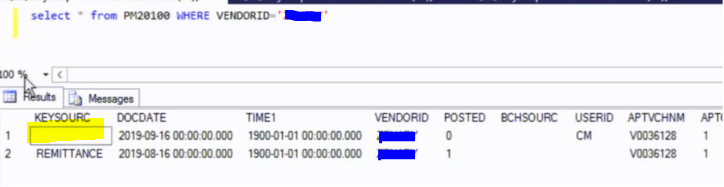
I therefore deleted this blank record using a simple SQL script

DELETE PM20100 WHERE VENDORID='<InsertVendorid>' AND KEYSOURC=''

And now I can successfully select the vendor in the “Edit Payables Cheque Batch” window.

I hope this helps explain the issue and also how it can be fixed if anyone else encounters this in the future.

Thanks for reading!