Introduction
A key process in any new Business Central implementation is posting and reconciling the opening balances.
While some opening balances, such as those in the General Ledger, Sales Ledger, and Purchase Ledger, are straightforward, others, like Fixed Assets and Goods Received Not Invoiced (GRNI), present unique challenges. (I’ve written about Fixed Assets opening balances here)
In this post I’ll go through the problem goods received not invoiced poses, and how I post the opening balances for Goods Received Not Invoiced (expected costs) in Business Central.
The Scenario
When going LIVE with Business Central it’s possible they’ll be a value on the Goods Received Not Invoiced (GRNI) general ledger account on the opening trial balance. This balance typically consists of pending Purchase Orders for Inventory that have been received but not yet invoiced.
For instance, a Purchase Order for 1000 units at £5 per unit, though received, remains un-invoiced, resulting in a credit balance of £5000 on the GRNI General Ledger Account (referred to as the “Inventory Interim Accrual Account” in Business Central).
As Inventory opening balances are usually brought in separately its usually not possible to enter those Purchase Orders manually in Business Central, or we would double count the Inventory value, therefore ideally we need a method to record the “in-flight” purchase order and also a way to “draw down” the existing balance on the GRNI account when the Vendor Invoice does arrive.
There are a couple of ways you can deal with this which I’ll outline below.
Solution 1 – Create Purchase Orders using a G/L Account
One approach involves creating a Purchase Order with a line item directed to the GRNI General Ledger Account for each pending Purchase Order. Using the earlier example, an in-flight purchase order for 1000 units at a unit cost of £5 would result in a credit balance of £5000 on the GRNI General Ledger account.
Therefore you’d create a Purchase Order as per below to record this in Business Central:
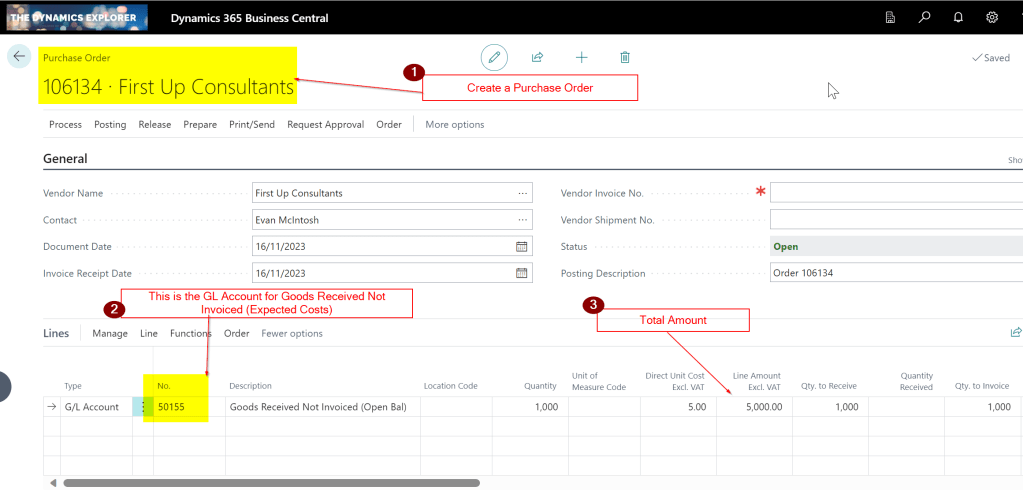
Then, when the Vendor Invoice for the goods arrives, you can invoice this Purchase Order which would Debit the Goods Received Not Invoiced account leaving a zero balance on the GRNI account.

Solution 2 – Create a Purchase Invoice using a G/L Account
Alternatively, you can bypass creating Purchase Orders and directly raise a Purchase Invoice against the GRNI account when the vendor invoice is received. Posting this Purchase Invoice would debit the GRNI account, again leaving a zero balance.
For example when the Vendor Invoice arrived you would raise and post this as per below

Other Considerations
In both scenario’s I find it best to create a separate GRNI account for the existing opening balance and have a new GRNI account for any GRNI (Expected Costs) postings when Purchase Orders are received in Business Central when the system goes LIVE. This separation makes reconciliation easier and you can also monitor the “drawing down” of the original GRNI balance separately from expected cost entries made from Purchase Orders received in Business Central.
Conclusion
This highlights a couple of methods that can be used to post opening balances for Goods Received Not Invoiced in Business Central.
While both approaches have their advantages, I do edge towards creating Purchase Orders with a line item pointing to a dedicated GRNI account for each in flight Purchase Order. This method helps with reconciliation both when the opening balances are posted and after go live. (you can monitor the balance in the GRNI account to the number of unposted Purchase Orders with G/L accounts pointing at the GRNI account).
Thanks for reading!
Want further help with Business Central?
If you’d like more help with Business Central, I also run Rapid365, which provides Business Central implementation and support services for UK businesses, supporting you through setup and go-live.
👉 View services and pricing at Rapid365.co.uk/pricing
 thedynamicsexplorer.com