Dynamics GP – Error message “Unhandled script exception: SCRIPTS – data area” opening the Payables Enquiry window

I’m come across this error a few times so thought I’d document on my blog.

The user is presented with the below error when opening the “Enquiry > Purchasing > Transaction by Document” window in Dynamics GP

When the window does open there’s a blank record showing in the scrolling window:

When you expand the window and attempt to select it you are prompted with the message “The selected record has been deleted by another user” and it disappears from the window

In this particular instance the issue is being caused by an incorrect PM Keys Record in the PM00400 table.

If I search for an incomplete record in the PM00400 table using the SQL query below this returns one record:

SELECT * FROM PM00400 
WHERE VENDORID='' AND DCSTATUS=3 AND DOCNUMBR='' AND DOCTYPE=0

If I then remove this record using the DELETE statement below the error no longer occurs when I open the window

* Always ensure you have adequate backups prior to deleting data from SQL

DELETE FROM PM00400 
WHERE VENDORID='' AND DCSTATUS=3 AND DOCNUMBR='' AND DOCTYPE=0

Please note you could also delete the entire contents of the PM00400 table and have the system recreate it using checklinks however this isn’t practical in my case.

I hope this helps anyone who encounters this issue in future.

Thanks for reading!

Thinking of making the move to Business Central? We can help

Dynamics GP – How can I use Dynamics GP when working from home?

As more people have made the switch to home working I keep getting lots of questions around using Dynamics GP from home. Although there’s a lot of information on this subject already, I also wanted to document this on my blog as well. (plus I can provide a link to my favourite article on this subject as well :))

In short using the Dynamics GP rich client is only supported in a LAN environment. Essentially this means that the Dynamics GP client application and the SQL server hosting the databases need to reside on the same LAN. When connected in this way there’s a high speed and reliable connection between the Dynamics GP application and the SQL server, which is the environment Dynamics GP is designed to run in. Therefore its not advisable, or indeed supported, to use a locally installed Dynamics GP client from home, via a VPN using your home internet connection.

Although it may appear to work, if you were to use a Dynamics GP client installed locally from home you’d at best suffer performance issues, and at worst cause potential data inconsistency when posting. This is because batches are much more likely to “crash” or get interrupted when posted in this environment (i.e. a WAN environment).

Therefore if you wish to use Dynamics GP from home the best option would be to connect and use Dynamics GP via an RDS server that resides on the same LAN as the SQL server. Alternatively you could connect to a PC in the office that has GP installed either via RDP or some other screen sharing software. Also, if its installed and available, there’s also the possibility of using the Dynamics GP Web Client for remote working.

As to “why” you can’t use Dynamics GP safely from home, David Musgrave of Winthrop Development Consultants wrote an excellent article on this subject which can be found here.

Thanks for reading.

Thinking of making the move to Business Central? We can help
Dynamics GP – Re-create Check Stub greyed out on Payables Payment Zoom window

My colleague alerted me to this one and as I could find no information for this online I thought I’d document it on my blog :).

A client logged a ticket saying the “Re-create Check Stub” option was greyed out on a few creditors as per below (this is how you can reprint the remittance advice).

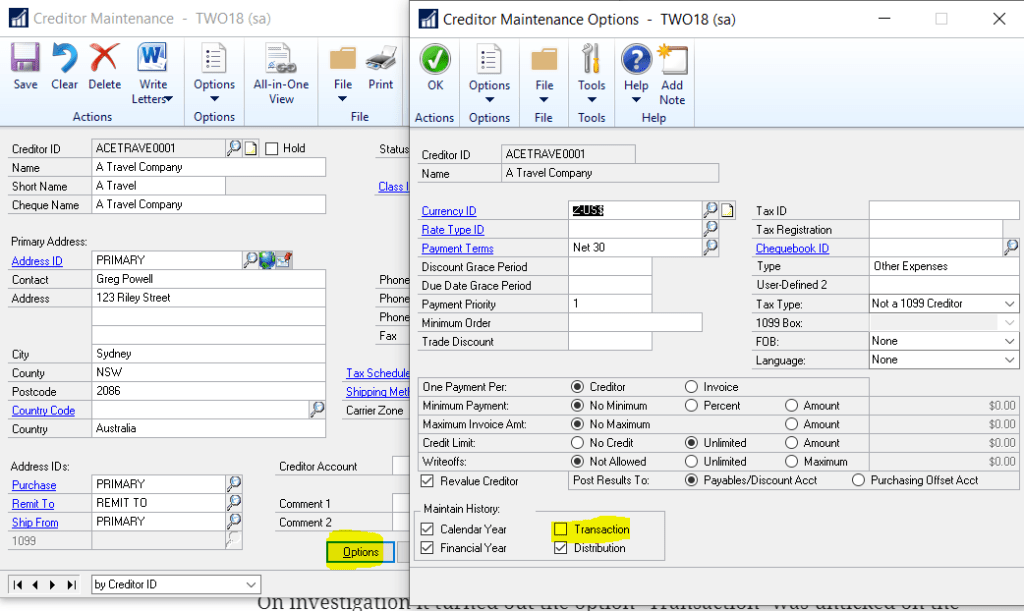
On investigation it turned out the option “Transaction” was unticked on the “Creditor > Options” page as per below:

If you simply tick this ON the option becomes available again.

What an awesome “feature” 🙂

Thanks for reading!

Thinking of making the move to Business Central? We can help