I’m come across this error a few times so thought I’d document on my blog.
The user is presented with the below error when opening the “Enquiry > Purchasing > Transaction by Document” window in Dynamics GP
When the window does open there’s a blank record showing in the scrolling window:
When you expand the window and attempt to select it you are prompted with the message “The selected record has been deleted by another user” and it disappears from the window
In this particular instance the issue is being caused by an incorrect PM Keys Record in the PM00400 table.
If I search for an incomplete record in the PM00400 table using the SQL query below this returns one record:
SELECT * FROM PM00400
WHERE VENDORID='' AND DCSTATUS=3 AND DOCNUMBR='' AND DOCTYPE=0
If I then remove this record using the DELETE statement below the error no longer occurs when I open the window
* Always ensure you have adequate backups prior to deleting data from SQL
DELETE FROM PM00400
WHERE VENDORID='' AND DCSTATUS=3 AND DOCNUMBR='' AND DOCTYPE=0
Please note you could also delete the entire contents of the PM00400 table and have the system recreate it using checklinks however this isn’t practical in my case.
I hope this helps anyone who encounters this issue in future.
Thanks for reading!
Thinking of making the move to Business Central? We can help
As more people have made the switch to home working I keep getting lots of questions around using Dynamics GP from home. Although there’s a lot of information on this subject already, I also wanted to document this on my blog as well. (plus I can provide a link to my favourite article on this subject as well :))
In short using the Dynamics GP rich client is only supported in a LAN environment. Essentially this means that the Dynamics GP client application and the SQL server hosting the databases need to reside on the same LAN. When connected in this way there’s a high speed and reliable connection between the Dynamics GP application and the SQL server, which is the environment Dynamics GP is designed to run in. Therefore its not advisable, or indeed supported, to use a locally installed Dynamics GP client from home, via a VPN using your home internet connection.
Although it may appear to work, if you were to use a Dynamics GP client installed locally from home you’d at best suffer performance issues, and at worst cause potential data inconsistency when posting. This is because batches are much more likely to “crash” or get interrupted when posted in this environment (i.e. a WAN environment).
Therefore if you wish to use Dynamics GP from home the best option would be to connect and use Dynamics GP via an RDS server that resides on the same LAN as the SQL server. Alternatively you could connect to a PC in the office that has GP installed either via RDP or some other screen sharing software. Also, if its installed and available, there’s also the possibility of using the Dynamics GP Web Client for remote working.
As to “why” you can’t use Dynamics GP safely from home, David Musgrave of Winthrop Development Consultants wrote an excellent article on this subject which can be found here.
Thanks for reading.
Thinking of making the move to Business Central? We can help
Recently I’ve been looking into how the “Unit Cost” is calculated for items using the “FIFO” costing method. I’ve found even if the item is set to “FIFO” the Unit Cost still displays an “Average Cost”. What’s more, depending on your “Inventory Setup”, this “Average Cost” might not be an as it seems either.
The answer lies in the role of the “Automatic Cost Adjustment” setting in “Inventory Setup”. (and therefore the “Adjust Costs – Item Entries” batch job)
In this post I’ll walk through a series of postings and check back on the “Unit Cost” while also checking the “Value Entries” to see what costs are being posted to the GL.
Here goes 🙂
Unit Cost when “Automatic Cost Adjustment” set to ALWAYS
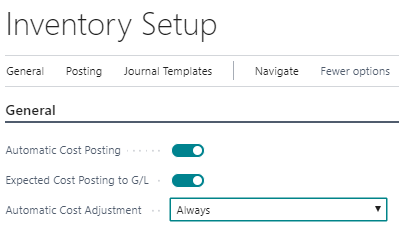
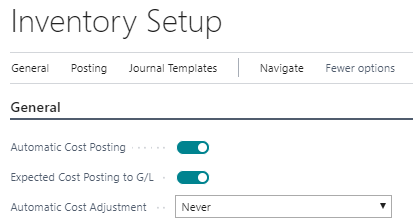
In the first test I set the option “Automatic Cost Adjustment” to ALWAYS in my Inventory Setup as per below:
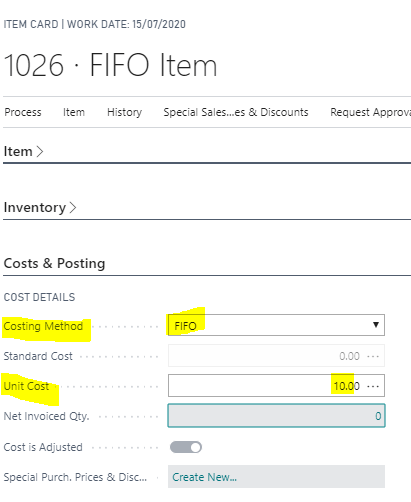
I then created a brand new item with a costing method of FIFO and gave it an initial “Unit Cost” of £10.00
With this configuration I then received and invoiced the following quantities and values:
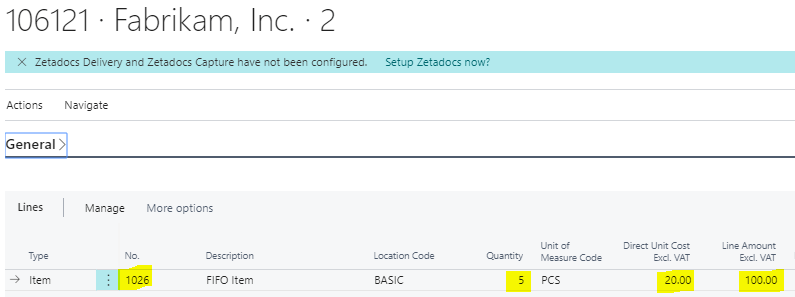
A Purchase Order with a Quantity of 5 and a unit cost of £20.00
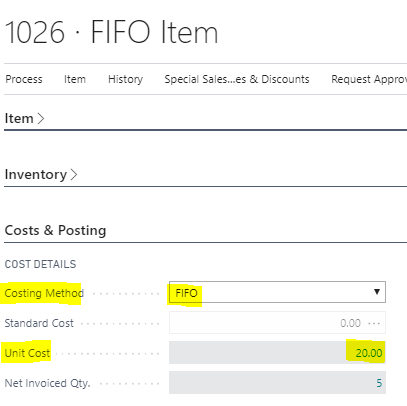
This changes my original “Unit Cost” to £20.00.
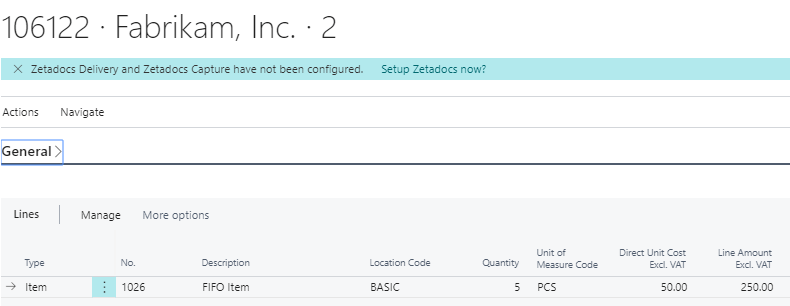
A Purchase Order with a Quantity of 5 with a unit cost of £50.00
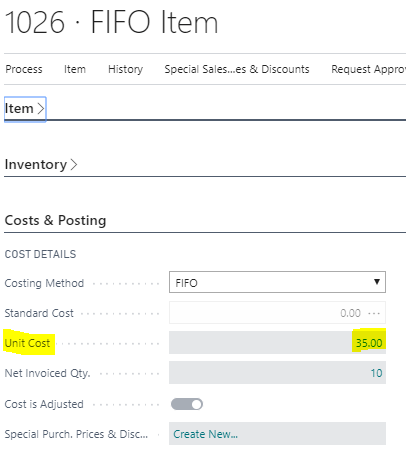
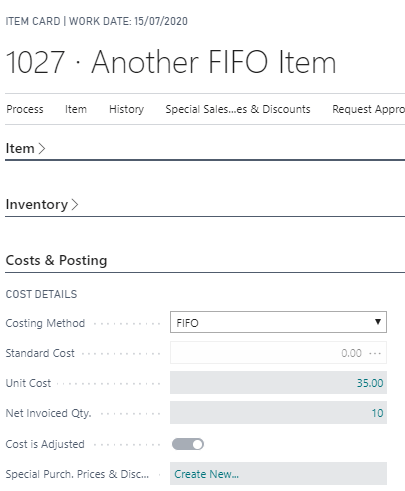
Now when I check the Unit Cost on the Item page its showing as £35.00.
So why is this, and what cost will be posted when I sell the item?
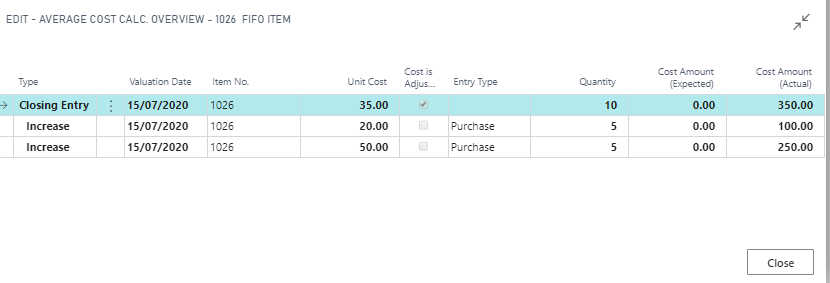
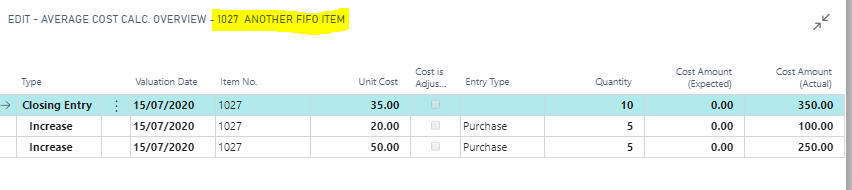
If you drill back on the “Unit Cost” the answer becomes apparent via the “Average Cost Calc. Overview” page:
This is showing that we have a quantity of 10 in inventory at a total value of £350.00 giving an average cost, and therefore a Unit Cost, of £35.00.
Selling an item
Things get really interesting when I now sell an item.
According to FIFO rules, when we sell an item, the system should post the actual cost from the first receipt (i.e. first in, first out). This cost isn’t £35.00, as is shown in the Unit Cost, it should be £20.00.
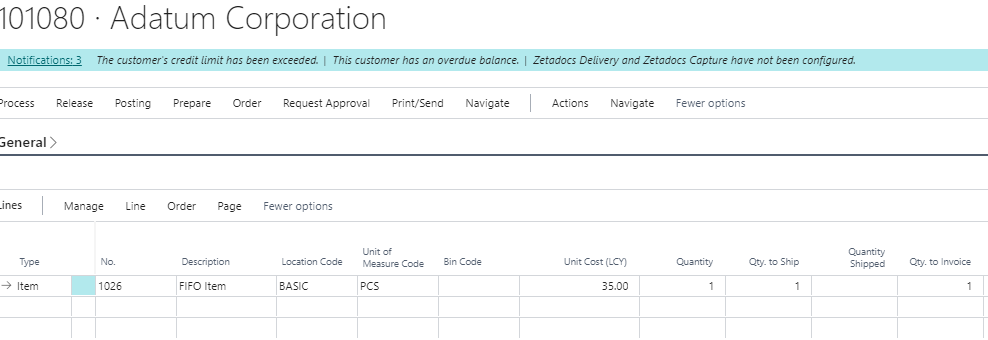
To see what happens I’ll ship and invoice a Sales Order for a Quantity of 1 as per below. (as you can see the Unit Cost displayed is £35.00)
Firstly, let’s check the “Unit Cost” on the item.
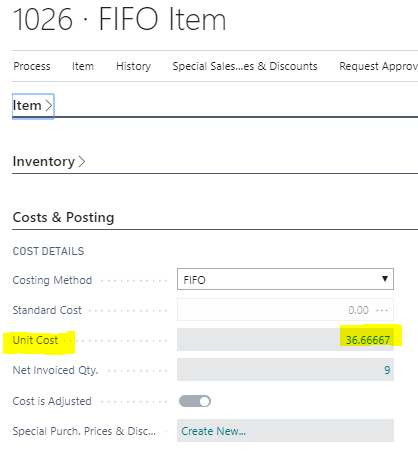
After posting the sales order if I now check the “Unit Cost” on the item you can see this has *automatically* (more on this later) been recalculated as per below:
Its now showing £36.66667 because we have a total of 9 in inventory at a total cost of £330.00 giving us an “Average Cost” of £36.66667 i.e. 330/9=36.66667.
So, what cost was posted to the GL for the Sales Order? Did the system post £35.00 or £20.00?
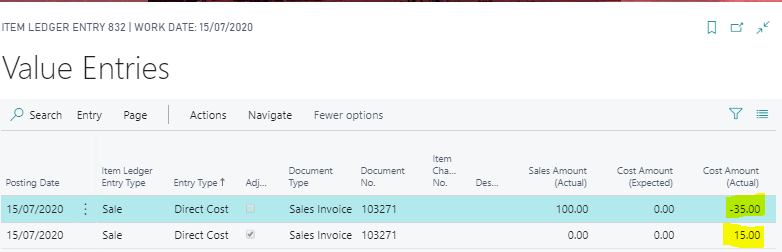
For this we’ll dig into the “Value Entries” on the item. As we can see the system posted an initial cost amount of -£35.00, as per the “Unit Cost” and then *automatically* posted an adjustment entry of £15.00 giving the correct FIFO cost of £20.00
The key takeaway here is the reason we get the additional “adjustment” posting of £15.00 *automatically* is because we have the “Automatic Cost Adjustment” setting switched to ALWAYS in the Inventory Setup.
As I understand it having this switched to ALWAYS runs the “Adjust Costs – Item Entries” batch job every time you post a transaction therefore posting the correct FIFO cost *automatically*.
Unit Cost when “Automatic Cost Adjustment” set to NEVER
Now, let’s test what happens to the “Unit Cost” and the FIFO costs when we have the “Automatic Cost Adjustment” set to NEVER.
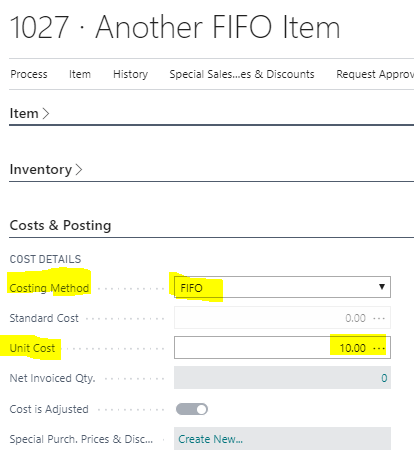
First, I’ll create a new item as per below using the same initial “Unit Cost” and a costing method of “FIFO” as the previous item:
I’ll raise the same Purchase Orders as before however for brevity I won’t include screen shots of the Purchase Orders on this occasion.
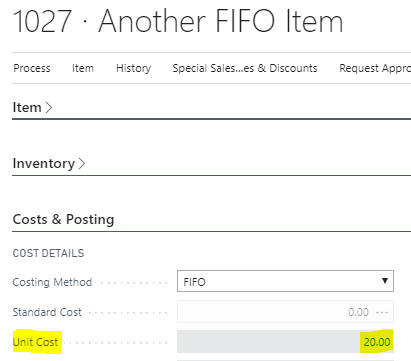
When we now check the “Unit Cost” the system is still showing £20.00 as per the first purchase order we received and invoiced. It hasn’t been *automatically* changed to the correct “Average Cost” of £35.00.
However if I check the “Average Cost Calc. Overview” by drilling back on the “Unit Cost” it shows we have a quantity of 10 at a total cost of £350.00.
So, why hasn’t the system updated the “Unit Cost” on the item on this occasion?
This is because we have switched “Automatic Cost Adjustment” to NEVER. This means the “Adjust Costs – Item Entries” batch job hasn’t ran when we posted the receipt and invoice for the Purchase Orders.
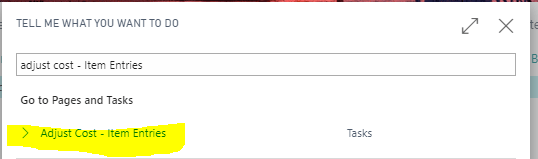
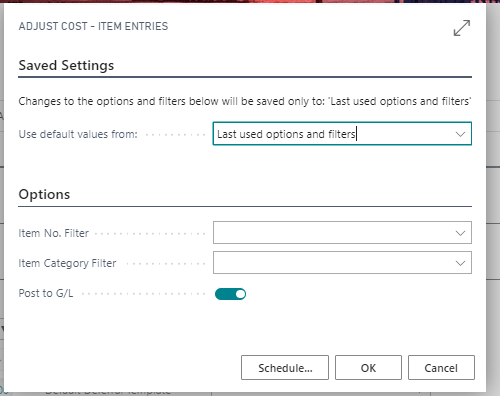
Therefore if we want to update the “Unit Cost” we must run the “Adjust Costs – Item Entries” batch job manually as per below:
Then click OK to run this for all items. (I could add a filter for my item if I’d prefer)
Now when I check the “Unit Cost” the correct Average Cost is now showing
Its also worth noting that if I leave the setting “Automatic Cost Adjustment” set as NEVER, when I post a shipment the “Value Entries” produced will be for the “Unit Cost” on the item i.e. now that is -£35.00 as we have ran the “Adjust Cost – Item Entries” batch job. The additional “Adjustment” Value Entry will only be produced when I next run the “Adjust Costs – Item Entries” batch job.
Conclusion
The “Automatic Cost Adjustment” setting has a direct impact on what is shown in the “Unit Cost” of an item. This determines when the “Adjust Costs – Item Entries” batch job runs which, amongst other things, also recalculates the Unit Cost on items.


 thedynamicsexplorer.com