Introduction
This blog was inspired by a forum post I answered recently that you can find here. The OP had issues reconciling their bank accounts because the opening balance hadn’t been posted. It also follows on nicely from other blogs I’ve posted with regards to posting opening balances. These are below:
How I post opening balances for reducing balance fixed assets and How I post opening balances for Expected Costs
In this blog I’ll show the steps I use when posting opening balances for bank accounts.
Preparation
When going LIVE with Business Central I always recommend reconciling all the outstanding bank entries in the source system. This is much easier nowadays as most payments are made electronically. Therefore there tends to be less “Unpresented Cheques” delayed by either the postal service or waiting to be deposited in the bank. This includes cash received from customers or payments made to suppliers.
If everything has been reconciled, it makes posting the opening balance much easier and cleaner.
Method for Posting the Opening Balance
When going LIVE with Business Central, I’ll usually have been provided with an opening trial balance, which includes the reconciled bank account balance which has been posted to the GL. I’ll use this as the basis of the bank account opening balance journal.
Its worth noting you could post the bank account opening balance at the same time as the GL opening trial balance, however I prefer keeping the two entries separate. Also, there are situations where an opening trial balance might not be available, whereas the opening bank position has been provided. (in the forum post the client had gone LIVE without a bank opening position, and this method can also be used to post a retrospective bank opening position)
For the bank account opening balance, I then need to post an entry that posts a Debit and Credit to the same Bank account GL code, but also creates a Bank Account Ledger Entry.
Worked Example
In this example I have a bank account that has an opening balance of £1000.00, which has already been posted to the GL. Therefore the GL code has a balance of £1000.00, however the Bank Account has a £0.00 balance.


As the GL has the correct balance, I need to post an entry that only updates the Bank Account Balance.
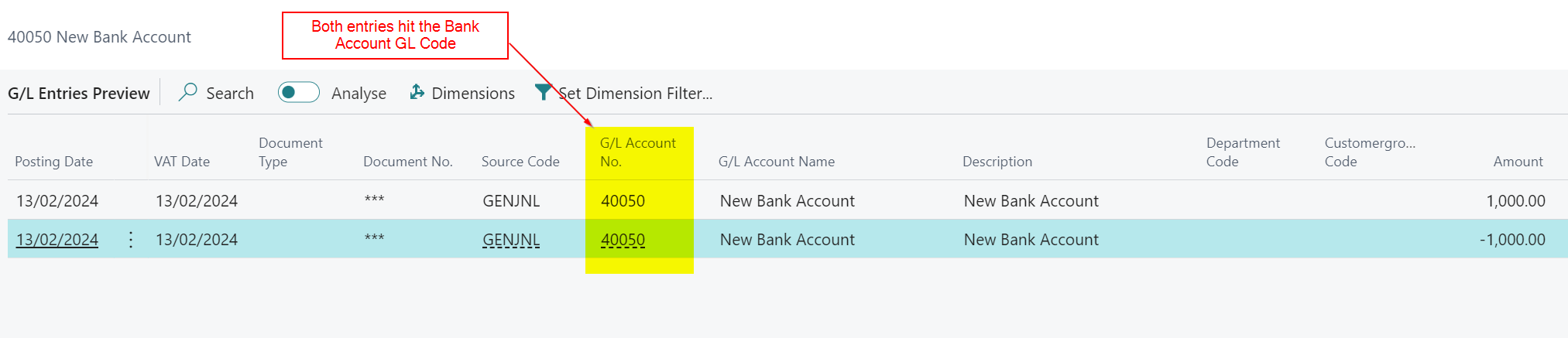
As mentioned above, to do this I’ll create a journal that debits and credits the 40050 code, but also creates a Bank Account Ledger Entry I can reconcile.
Therefore I’ll post the journal below, that posts to the Bank Account and balances to the Bank Account GL code

This creates GL entries that both debit and credit the Bank Account GL code but also a Bank Account Ledger Entry that hits the Bank Account
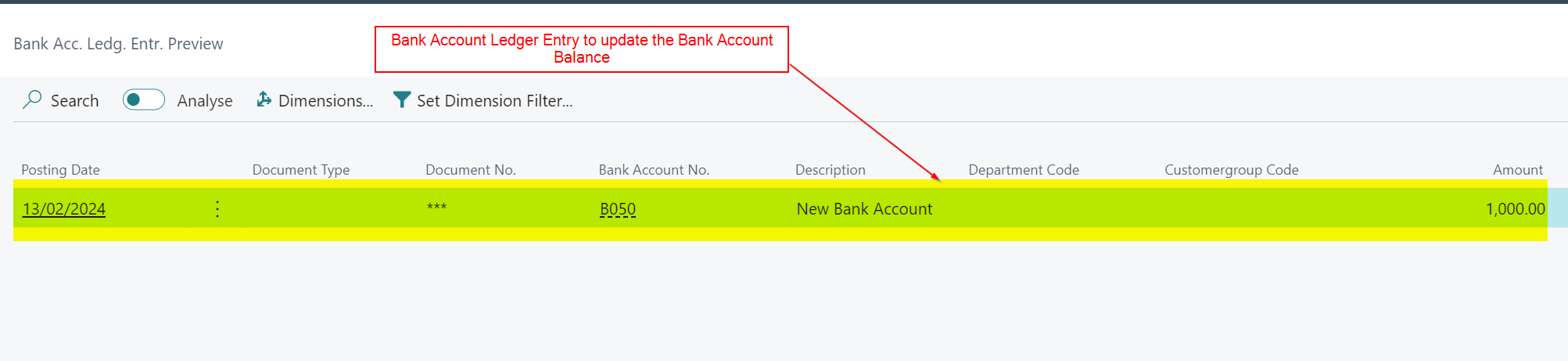
After posting this I have a Bank Account Balance that matches the GL balance


Conclusion
This is a quick and easy method for posting opening balance entries to Bank Accounts. This can be done either during or after you receive the General Ledger opening balances.
I hope this helps when posting your opening balances or retrospectively fixing any issues with the bank account.
Thanks for reading!
Want further help with Business Central?
If you’d like more help with Business Central, I also run Rapid365, which provides Business Central implementation and support services for UK businesses, supporting you through setup and go-live.
👉 View services and pricing at Rapid365.co.uk/pricing


Hi,
How would you deal with opening balances when there are payments to clear? What entries would I need to make in order for the bank rec to balance and the opening balance to still match my old system.
LikeLiked by 1 person
You post the payments in a similar fashion i.e. you ensure both sides hit the bank GL account. For example, if your opening balance is £100k and you have £5k of uncleared payments you’d post an opening position of £105k and then the uncleared payments at £5k. This should match your GL opening position of £100k 🙂
LikeLike
Hi Gavin,
I have tried this and it works. However, when i run the test report i get the following warning: –
“Warning! Bank reconciliation might not be possible because there are direct posting entries”
Is there any way to remove this?
Many thanks
LikeLiked by 1 person
Hi. As always thanks for reading and taking the time to comment on the post 🙂
Unfortunately I don’t know how to remove this I’m afraid. I suppose the message is factually correct as we do have direct postings however in this case Bank Reconciliation is possible 😊.
If you are entering the GL opening balance at the same time as the bank opening balance its likely a good idea to use “Bank Account” as the account on the GL opening balance as then you’ll get a Bank Account Ledger Entry you can reconcile and you wouldn’t get this warning. However there are many occasions where this isn’t possible because you don’t get the opening balances all at the same time so this method is then used 😊.
LikeLike
Thanks Gavin,
I will have a play around 🙂
Best Regards
LikeLiked by 1 person