A colleague and I worked on a very interesting support ticket today. A client reported that when logging into Dynamics GP using their own Dynamics GP User ID they received the error “No Obligations Found” when retrieving the obligations for the VAT Return however it worked fine when logged in as “sa”.
**Please note there has been a service pack to correct this exact issue however this has been applied to the clients system so it can’t be causing this issue**.
As this worked with “sa” we checked the SQL Error log and surprisingly we found the following messages recorded at the time the routine had been ran:
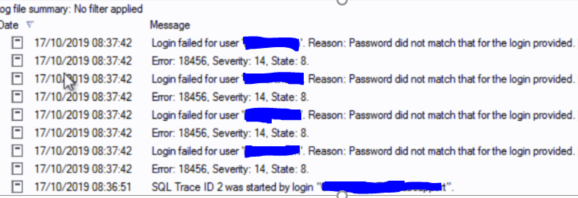
As you can see the error log is scattered with “Login failed for user” messages for the user in the question.
The next part of the investigation was to setup a SQL Profile Trace to see what SQL statements were running just prior to the login failed message and we found the following:
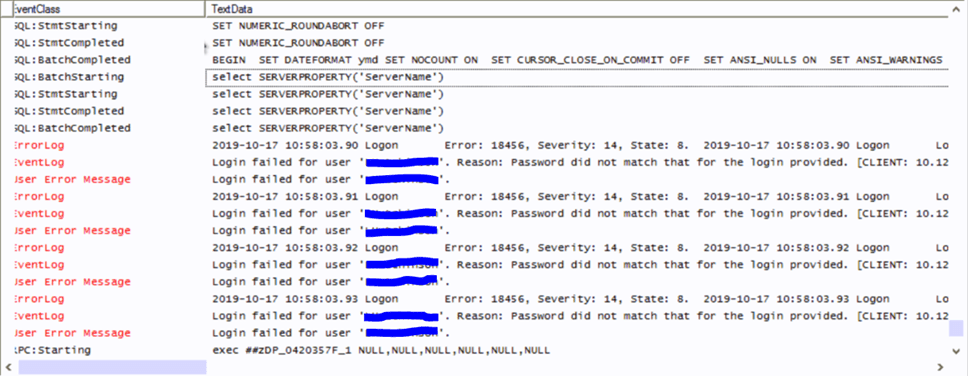
As you can see the SQL statement “select SERVERPROPERTY(‘ServerName’)” runs just prior to the login failed errors.
My colleague then recalled they are using a DNS Alias for the SQL server name in the ODBC connection rather than the actual SQL server name.
We therefore ran “select SERVERPROPERTY(‘ServerName’)” on the server and, as expected, this returns the actual SQL server name rather than the alias name that is used in the server name in the ODBC connection on the clients PC.
Intrigued that the issue could somehow be related to how GP encrypts passwords using the SQL server name we setup the following test:
- Created an additional ODBC connection on the clients PC pointing to the actual SQL server name rather than DNS Alias name.
- Logged into Dynamics GP as “sa” using this new ODBC and created a new GP user, copying the security of the existing user. (so the password gets encrypted using the actual SQL server name)
- Finally, we logged into GP using the new ODBC and the new GP user.
After successfully logging in using the new user, and the ODBC pointing at the actual SQL server name, we walked through retrieving the obligations and the whole process worked. We also checked the SQL error log and there were no “Login Failed” error messages for the user.
I have to admit at this point I’m guessing as to what is going on however based on the results of this isolated test I can only assume that somehow during this process the users Dynamics GP credentials are being re-submitted to SQL using the actual SQL server name, and as the users password is encrypted with the SQL server DNS Alias name, its failing with “Login failed”. This works when logged in as “sa” because this is the only User ID that doesn’t have its password encrypted by GP. (its not encrypted because its the SQL System Administrator account)
Therefore although using a DNS alias can help with server changes (ironically because of how GP encrypts the password), this has got us thinking that using a DNS Alias for the SQL server could be causing other issues with GP that we don’t know about, so we may avoid this in the future if we can.
After discovering this little oddity I’d be interested if anyone else has any other experience of issues when using a DNS Alias for the SQL server.
Disclaimer :- I’d usually attempt to recreate this type of issue on my own system before documenting and sharing however I can’t in this instance as I don’t have an account with HMRC to complete the full process. However given how interesting this does seem I thought it worthwhile sharing anyway.
Thanks for reading.
 thedynamicsexplorer.com