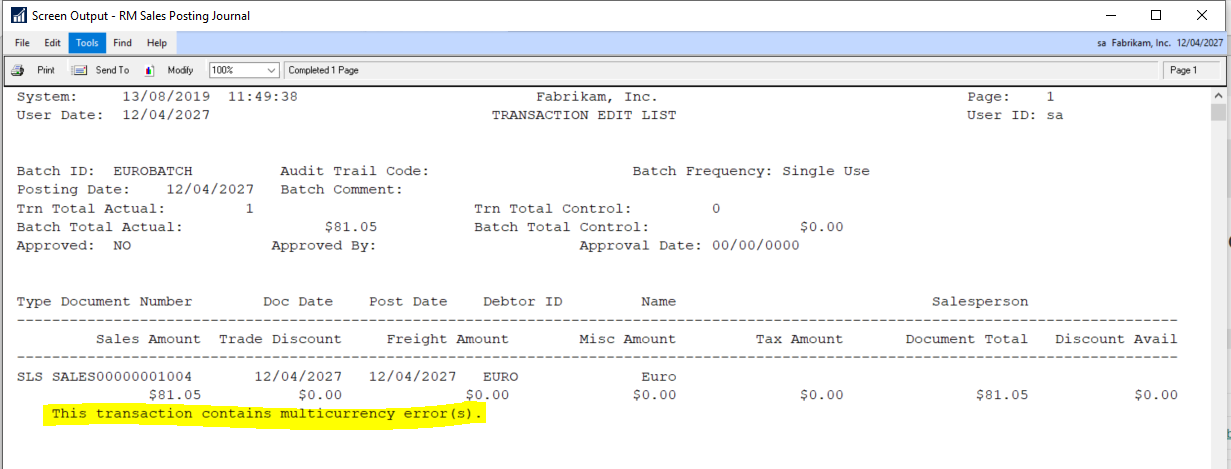
A client reported the following error on the posting journals when trying to post both Receivables and Payables Transactions. “This transaction contains multi-currency error(s)”
This transaction contains multicurrency errors
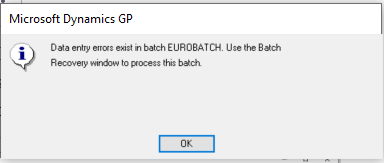
This was followed by a message informing them that the batch had gone to recovery.
I checked the usual things like exchange rate expiration dates however everything seemed fine.
The client then explained they had overwritten some exchange rates accidentally but had since changed these back however the error persisted.
I delved a little deeper using SQL and noticed that although the dates and rates were the same the TIME1 value in the MC020102 table for the transactions differed slightly from the TIME1 value in the DYNAMICS..MC00101 for the exchange rate in question.
Affected transaction showing differing TIME1 value from setup
As a test I changed one of the transactions by updating the TIME1 value in the MC020102 table to match the relevant TIME1 row in MC00100 using the script below.
UPDATE MCTRX
SET    MCtrx.time1 = MC.time1
FROM   mc020102 MCTRX
       INNER JOIN dyn2018r2..mc00100 mc
               ON mc.exgtblid = MCTRX.exgtblid
                  AND mc.xchgrate = MCTRX.xchgrate
                  AND mc.exchdate = MCTRX.exchdate
WHERE  MCTRX.docnumbr = 'SALES00000001004'
I then printed an edit list of the batch and the error had gone.
Now I knew how to fix the issue I realised I could also resolve this by just opening the transactions in the entry window and re-selecting the exchange rate however there were 1000’s of affected transactions so I used the script below. (this was affecting all multi currency transactions in WORK batches so I just had to filter on DCSTATUS)
UPDATE MCTRX
SET    MCtrx.time1 = MC.time1
FROM   mc020102 MCTRX
       INNER JOIN dyn2018r2..mc00100 mc
               ON mc.exgtblid = MCTRX.exgtblid
                  AND mc.xchgrate = MCTRX.xchgrate
                  AND mc.exchdate = MCTRX.exchdate
WHERE  mc.time1 <> MCTRX.time1
       AND DCSTATUS = 1   --add this so only WORK trx are affected
After running this script all sales transactions posted fine.
Next I turned to the payables transactions which just involved a small tweak to the original script and also an update to a different table to correct currencies for the multi currency payables payment batch header.
--First fix Payables multi currency trx

UPDATE MCTRX
SET    MCtrx.time1 = MC.time1
FROM   mc020103 MCTRX --Changed to MC020103 for payables trx
       INNER JOIN dyn2018r2..mc00100 mc
               ON mc.exgtblid = MCTRX.exgtblid
                  AND mc.xchgrate = MCTRX.xchgrate
                  AND mc.exchdate = MCTRX.exchdate
WHERE  mc.time1 <> MCTRX.time1
       AND DCSTATUS = 1

--Also fix the batch header currency values for payment batches

UPDATE batch
SET    batch.time1 = mc.time1
FROM   mc00500 batch --batch header multi currency table
       INNER JOIN dynamics..mc00100 mc
               ON mc.exgtblid = batch.exgtblid
                  AND mc.xchgrate = batch.xchgrate
                  AND mc.exchdate = batch.exchdate
WHERE  mc.time1 <> batch.time1
Once I’d ran through all this the transactions posted fine.
Hopefully this will help someone in the future who may face a similar issue however always remember to have a good backup of your data before running any SQL scripts and test whenever possible.
Thanks for reading!
Thinking of making the move to Business Central? We can help
On occasion a batch can be accidentally deleted from the system, and for one reason or another it would be interesting to find out which user did this. In this post I aim to show how this might be possible using some SQL functions to query the SQL transaction log. (I appreciate there are options available to prevent users deleting batches however I’m not covering this)
Pre-requisite and Considerations
One pre-requisite is that the SQL database must be in the FULL recovery model. This won’t work in the SIMPLE model as the transaction log information is lost at each checkpoint.
Another consideration
you must make is that the process of posting a batch in Dynamics GP effectively
deletes the batch header from the SY00500 table as well. Therefore, the result
set from the query could include both genuine deletes, caused by posting
batches, and deletes that have happened accidentally. However if you know a
little detail about the batch that you wish to track like the type of batch
that was deleted, and approximately the number of transactions in the batch, I’m
hoping the result you get back from this query will assist you in making an educated
guess as to if this is actually the deleted batch you were looking for.
The Theory
In SQL every
INSERT\UPDATE\DELETE operation is first logged in the transaction log before
being written to the database. Therefore, theoretically using a SQL function
you can query the transaction log looking for DELETEs to tables and objects.
I mentioned earlier that the database must be in the FULL recovery model. To expand on this if the database is in the SIMPLE recovery model then after the INSERT\UPDATE\DELETE transaction commits, and a checkpoint occurs, that transaction log information is lost. Therefore you won’t be able to query the transaction log for deletes when the database is in SIMPLE recovery model.
However when the database is in the FULL recovery model, the log information isn’t lost until a LOG backup is performed. Therefore using a SQL function you can query the log looking for deletes.
Finally, all is not lost if you have performed a log backup since the delete occurred as you can use another SQL function to query the transaction log backup file that resides on disk. You just need to know the file name of the backup and its location on disk.
Use FN_DBLOG to query the transaction log
To demonstrate the process, I first created the following batch in Dynamics GP which contains one transaction.
I then deleted the batch from Dynamics GP and using the query below I can identify SQL transactions that include a delete on the batch headers table. (SY00500). Please note this needs running the company database.
SELECT [transaction name],
       users.NAME,
       [transaction id],
       operation,
       allocunitname,
       [begin time],
       [end time],
       [transaction name]
FROM   Fn_dblog(NULL, NULL) trnlog
       LEFT JOIN sys.sysusers users
              ON trnlog.[transaction sid] = users.sid
WHERE  [transaction id] IN (SELECT [transaction id]
                            FROM   Fn_dblog(NULL, NULL)
                            WHERE  operation IN ( 'LOP_DELETE_ROWS' )
                                   AND allocunitname LIKE '%sy00500%')
This gives the following results
As you can from the results above there’s a SQL Transaction that includes a deletion to the batch header table (SY00500) and associated objects (i.e. the indexes). This is SQL Transaction ID 0000-00045d05. As part of the same transaction you can see deletes to GL tables and objects therefore its clear this is a GL batch that was deleted. You can also see the user who deleted the batch in the “name” column.
Use FN_DUMP_DBLOG to query the transaction log
If a transaction log backup has occurred since the batch was deleted, you won’t be able to use the query above as the log will have been cleared. However you can query the SQL transaction log backup file directly using a different SQL function called FN_DUMP_DBLOG.
To test this I performed a transaction log backup and gave it a file name of C:\Program Files\Microsoft SQL Server\MSSQL14.SQL2017\MSSQL\Backup\TWO18_3.trn and used the query below to look for the same delete I performed earlier. (please note in this query I had to change a few things as the object name didn’t work without joining to another system table)
This gave me the output below which is the same as the original output. Its just the data resides in the transaction log backup file now. (i.e. its the same SQL Transaction ID)
If you don’t find the delete you can just alter the backup file name and keep searching through your backups.
Conclusion
Therefore
although not 100% ideal this is one method that can assist in identifying a
user that has deleted a batch in Dynamics GP.
You can also use the same method to find out which user deleted other transactions you just need to alter the object name.
I’d also like to note that although I have tweaked the SQL scripts I’ve used in this post myself, I most certainly had to stand on the shoulders of several SQL giants along the way. I’m sure everyone is aware the SQL community is also awesome at sharing information to help others like me!
Thanks for reading!
Thinking of making the move to Business Central? We can help


 thedynamicsexplorer.com