The 2024 wave 1 update of Business Central introduces the new “Chat with Copilot” feature. However, at the moment, this is only available in the US localisation of Business Central.
If like me you can’t wait to try this out, and you are outside of the US, you can still do this by creating a Sandbox with the US localisation.
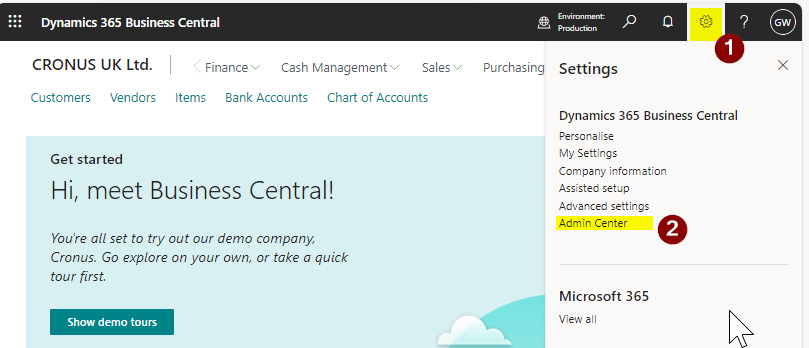
To do this go to the “Admin Centre” in Business Central as per below.
**You’ll need to have permissions to access this. I explain the permissions needed in this YouTube Video)
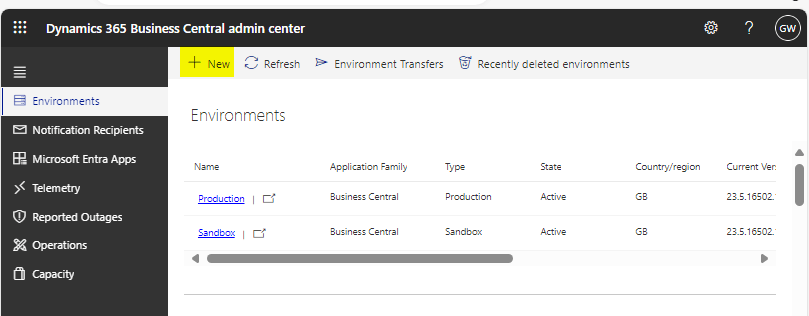
Once in the Admin Centre click “New”
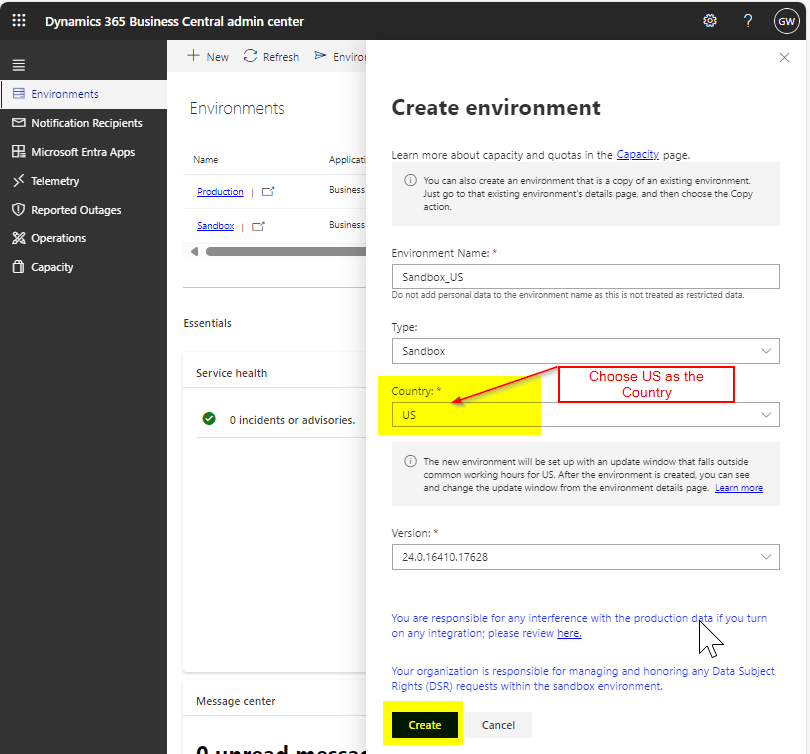
Enter an Environment Name, select the “Type” as “Sandbox” and select the “Country” as “US”.
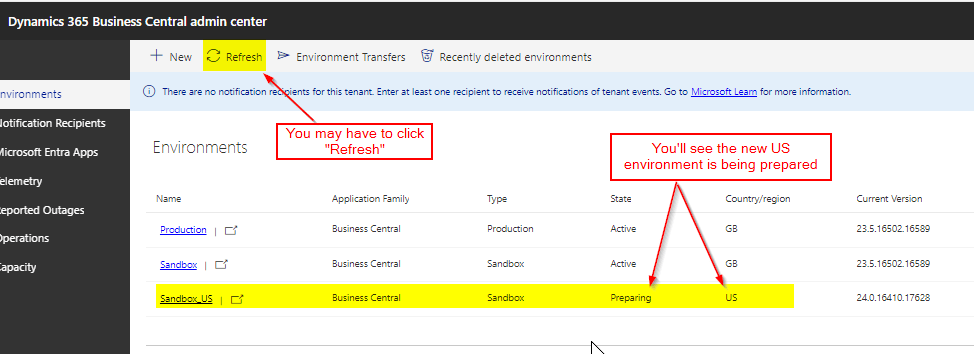
You can then see the Environment “preparing”.
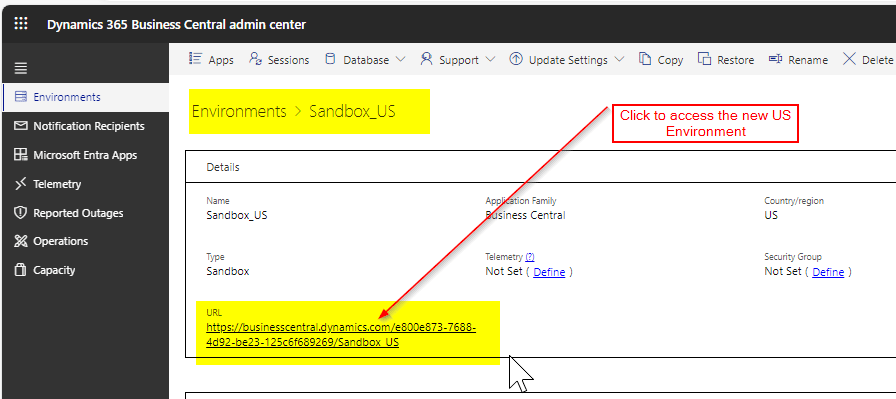
Once the Sandbox is Active you can click the “Sandbox_US” link and then the URL to access the Sandbox:
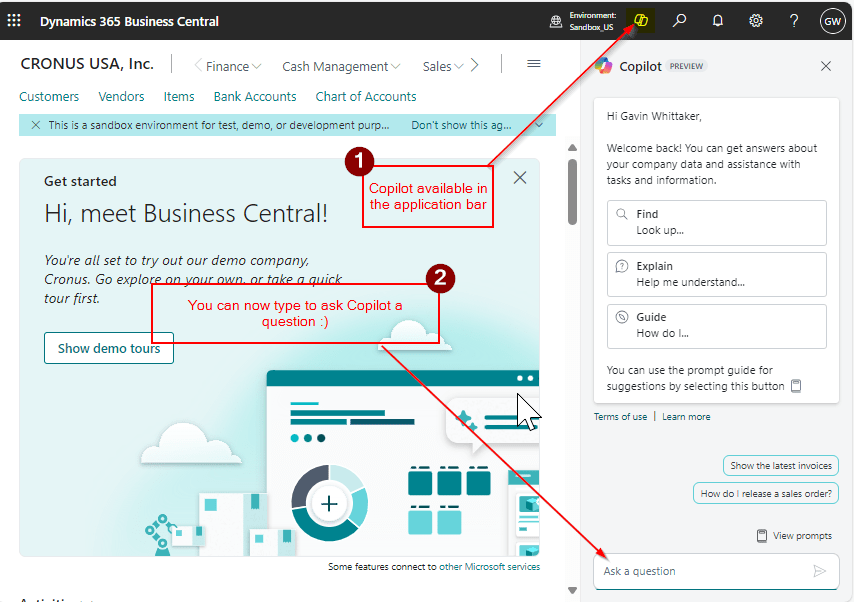
Once in Business Central you can see you have the Copilot icon in the Application Bar
You can now start experimenting with the new Chat with Copilot feature 🙂
You can find out more about Copilot using this link.
This is the sixth video in the video series “Making the most of your Business Central Trial”. This video series is intended to help new users on their journey with the Business Central Trial, although it may also prove helpful for those already familiar with Business Central.
In this video I go one of the key concepts of Business Central: Posting Groups.
I cover the three different types of Posting Groups: Specific, General and VAT Posting Groups. I use the example of a Sales Order to show how Business Central uses all the predefined posting groups to produce the GL Entries when you post the Sales Order to an Invoice. I show why posting groups are such a fantastic feature of Business Central, offering lots of flexibility.
I also highlight how you can use this information to think about how your Chart of Accounts might work with Business Central.
At its core Invoice factoring or discounting is a service businesses can use to improve cash flow. There are various flavours and services that are offered by different institutions and companies but essentially its a service that enables businesses to “sell” some of its debts (i.e. its outstanding Sales Invoices) to an invoice factor/discounting company and receive immediate cash for a fee or commission.
In this blog I’ll go through how I’ve configured Business Central to manage this scenario.
Configuring the Bank Accounts
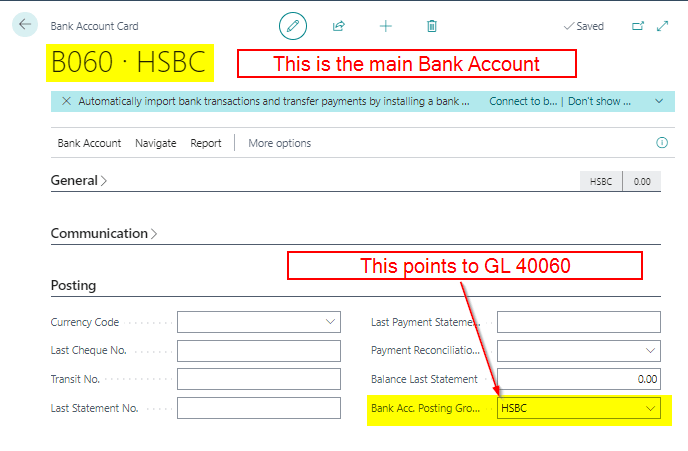
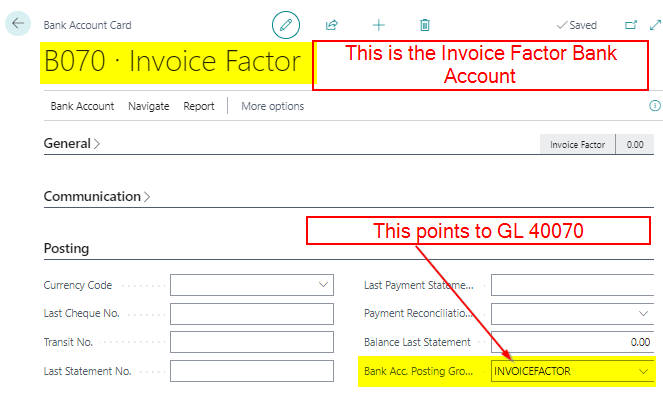
The first thing to do is to configure the relevant bank accounts in Business Central.
To do this I’ll configure my main Bank Account and also a Bank Account for the Invoice Factoring company.
Scenario / Walkthrough – Drawing down from the Invoice Factor Account
The scenario I have is I’ve sold goods for £10,000.00 on 30 day payment terms to my Customer. However, rather than wait for the Customer to pay, I’ve passed this sales invoice to the Invoice Factor company. This means I can now “draw down” some of the cash from the Invoice Factor immediately to improve my cash flow :).
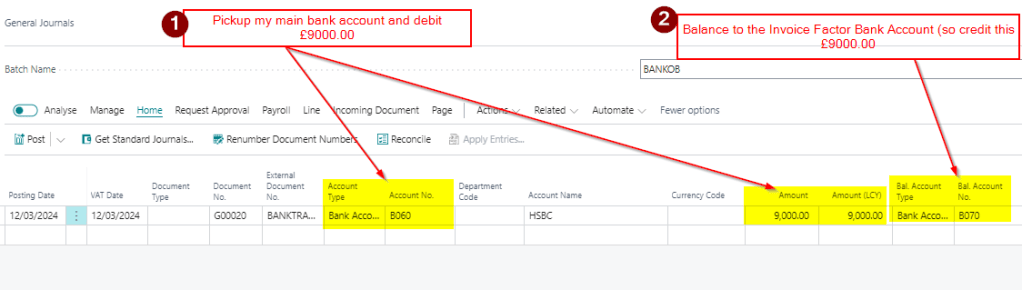
I therefore post a bank transfer of £9,000.00 from the Invoice Factor to my Main Bank Account. I’ll do this as a General Journal as per below:
I’ll now have £9000.00 in my main Bank Account as an Asset and my Invoice Factor account is showing a £9000.00 liability.
I also have a reconciling entry in both accounts I can reconcile from the relevant bank statements of my main bank account and the invoice factoring account.
Scenario / Walkthrough – Applying the Customer Invoice
Once the customer has paid the invoice to the factoring company I need to post and apply this to the Sales Invoice as the invoice is now fully paid.
I’ll use a Cash Receipt for this and pickup the Invoice Factoring Bank Account as this is where the cash has been paid:
This has fully paid the invoice, therefore reducing my Accounts Receivable to £0.00, and also posting a Debit of £10,000.00 to the Invoice Factoring bank account.
I now have a £9000.00 debit balance on my Main Bank Account and a £1000.00 debit balance on my Invoice Factoring account.
Scenario / Walkthrough – Paying the Invoice Factoring Fee
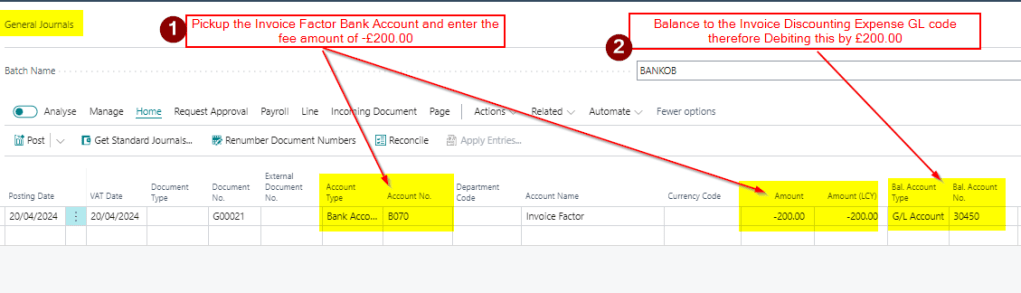
Now when I receive my statement from the Invoice Factoring company I have a fee of £200.00 for their services.
I therefore need to post this to the Invoice Factor Bank Account as a Credit and balance this to an expense code.
I’ll use a General Journal for this as per below:
Scenario / Walkthrough – Bank Reconciliation
All these transactions have been posted to either the main bank account or the invoice factoring bank account. I can therefore reconcile both Bank Accounts in same way I would any other Bank Account.
My main bank account will have a reconciling entry for the £9,000.00 I transferred from the Invoice Factoring Bank Account and my Invoice Factoring Bank Account has the £10,000.00 I received from my customer and the £200.00 fee.
Conclusion
This is a very simple contrived example showing one transaction in an invoice factoring scenario however the theory is the same for many transactions.
You can continue sending Sales Invoices to the factoring company and “drawing down” cash via bank transfers and posting and applying cash when its been received by the invoice factor. You can also keep posting entries to the Invoice Factoring account for fees therefore reducing its balance.
As with most things in Business Central there are many different ways to achieve the same goal, this is just one way to configure Business Central when using Invoice Factoring facilities and services.

 thedynamicsexplorer.com