Introduction
The UK version of Business Central gives the ability to submit your VAT return via the Making Tax Digital functionality. This enables you to connect to HMRC and download your VAT obligations and subsequently submit your VAT return.
However I’ve found that sometimes even though the VAT return has been submitted to HMRC and the “VAT Return Status” changes to “Accepted” the “Status” of the VAT Return remains as “Open” and consequently the message “Your VAT Return is Overdue…” is displayed on the Home Page (depending on your role centre) and also in the “Additional Information” on the VAT Return Periods page.
In this post I’ll walkthrough how you can remove this message.
VAT Returns Period Page
As per the screen shot below I’m getting the message “Your VAT return is overdue since 07/08/23” in the “VAT Return Periods” page however the VAT Return Status is “Accepted”.

The period in question is 01/04/2023 (1st of April 2023) until the 30/06/2023. Therefore in order to remove this message I click “Get VAT Return Periods” and enter the same dates into the page as per below

The system then connects to HMRC to gather data on that range and although there are no new overdue VAT Return Periods in that date range it updates the status of any VAT returns within the date range.
You are then presented with the update box below

This message states “Retrieve VAT return periods successful. Including 0 new and 1 modified”.
This means although no new VAT Return Periods were received in the date range 1 was modified.
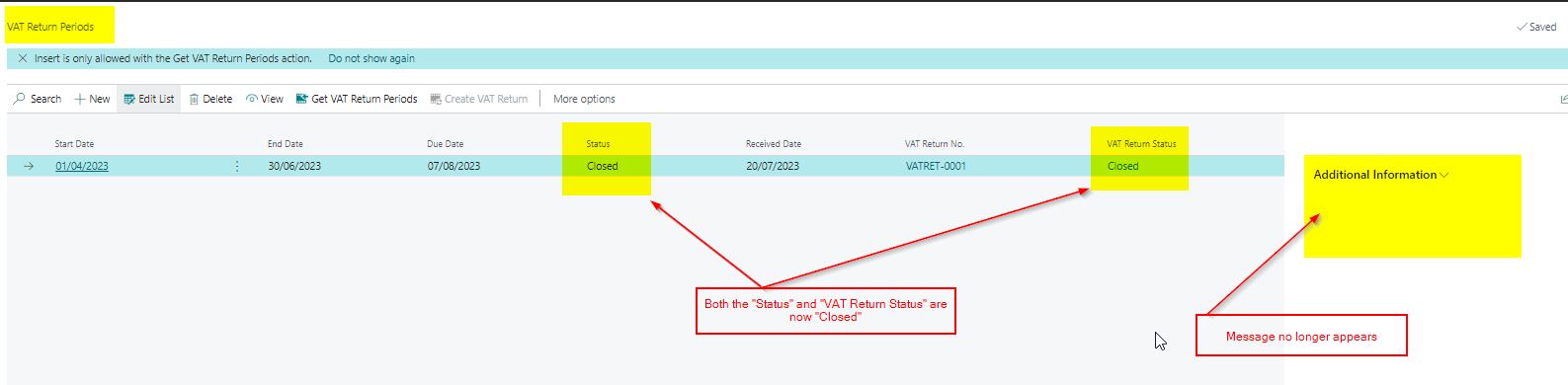
Now both the “VAT Return Status” and “Status” are closed and the message has gone 🙂
Conclusion
This post explains how you can update both the “VAT Return Status” and “Status” of a submitted VAT return using the “Get VAT Return Periods” option.
If you have numerous VAT returns showing the same issue you can enter a large date range and have the system update all your VAT return statuses.
Thanks for reading!
 thedynamicsexplorer.com